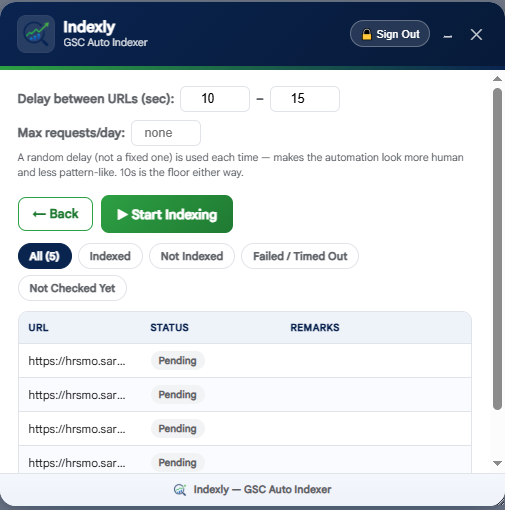
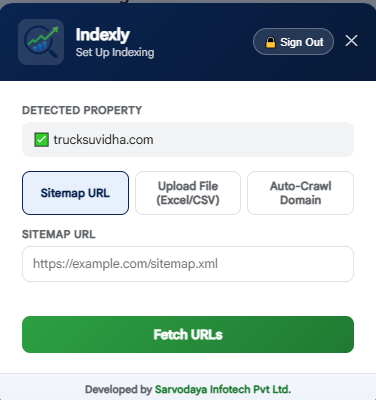
Indexly is a free Chrome extension that checks and requests indexing for every URL on your site, directly inside Google Search Console. It loads URLs from a sitemap, an Excel/CSV file, or an auto-crawl, and records the exact reason for each URL that isn't indexed. No API keys, no black box.
Search Console's own "Inspect any URL" box is the most reliable way to check and request indexing — but doing it one URL at a time for a site with hundreds of pages isn't realistic. Indexly automates exactly that box, at a pace that looks and behaves like a person doing it.
Every feature exists because a real indexing run needs it — not because it sounded good on a features page.
Point it at a sitemap URL, upload an Excel or CSV list, or let it auto-crawl the whole property's internal links directly — no sitemap required.
Every status comes from the real "Inspect any URL" box on the page you're already looking at — not a cached API guess.
Checks its own record of past runs before touching Search Console at all, so already-indexed URLs are never re-tested for no reason.
When a URL isn't indexed, Indexly surfaces the actual reason — a 404, a server error, a redirect, a noindex tag, a canonical issue — right in the results.
A randomized delay between URLs and an optional daily request cap keep the run well within reasonable, human-like limits.
Every run ends in a downloadable Excel report — URL, status, and remarks for each one — plus a saved summary you can revisit later.
| Source | Best for | What Indexly needs from you |
|---|---|---|
| Sitemap URL | Sites with an up-to-date, maintained sitemap | Just the sitemap link |
| Excel / CSV upload | A specific, hand-picked list of URLs | A spreadsheet with one URL per row |
| Auto-Crawl Domain | Sites with no sitemap, or a stale one | Nothing — it crawls the property's own pages directly |
Indexly's button appears right next to the "Inspect any URL" box — it never leaves the page you're already on.
Sitemap, upload, or auto-crawl — whichever matches how your site is set up.
Adjust the delay range and daily cap if you want to, then let it run — pause, resume, or stop anytime.
See exactly what happened to every URL, with reasons for anything that wasn't indexed, and download the full Excel report.
No — and be wary of anything that claims to. Indexing and ranking decisions are made entirely by Google. Indexly automates the request; whether and when a page gets indexed is Google's call.
No. It drives the real Search Console page you're logged into — the same "Inspect any URL" box and "Request Indexing" button you'd click yourself.
Yes — pause, resume, or stop at any point, and the report reflects exactly how far it got and why it ended.
If Indexly's own records already show it as indexed from a previous run, it's skipped entirely — it's never re-checked on Search Console for no reason.
Why Search Console has no bulk button, how to automate the Inspect and Request indexing steps, and what to do when a URL still isn't indexed.
Read the guide →What this Search Console status means, how it differs from "Discovered", and a practical checklist for pages Google fetched but didn't index.
Read the guide →You don't need a sitemap to be indexed. Make every page linkable, then use Auto-Crawl Domain to check and request indexing from your own internal links.
Read the guide →Add Indexly to Chrome and open any Search Console property to get started.
Indexly by Sarvodaya Infotech Pvt. Ltd. · Guides · Chrome Web Store · Privacy Policy · Terms & Conditions