Open a property in Search Console
Go to the URL Inspection page for the property you want to work on. Indexly's button appears right next to Google's own "Inspect any URL" box — it doesn't open a separate tab or dashboard.
Choose how to load your URLs
Pick a sitemap URL, upload an Excel or CSV file, or let Auto-Crawl Domain find every page on its own. Whichever you choose, you'll see the total URL count before anything starts.
Set your pacing
Adjust the delay range between URLs and, if you want one, a daily cap on how many indexing requests get sent. The defaults are sensible if you'd rather not touch them.
Start the run
For each URL, Indexly first checks its own records — if it already knows the URL is indexed, it's skipped entirely. Otherwise, it runs the real live check on Search Console.
Not indexed? It requests indexing — and tells you why
If a URL isn't indexed, Indexly records the specific reason Google gives, then clicks Request Indexing the same way you would, and waits for the real confirmation before moving on.
Pause, resume, or stop whenever you want
A run doesn't have to finish in one sitting. Pause it, come back later, or stop it outright — the report reflects exactly where it ended.
Review the report
When the run ends, you get a full breakdown — indexed, not indexed with reasons, requested, skipped, failed — and a downloadable Excel file with a row for every URL.
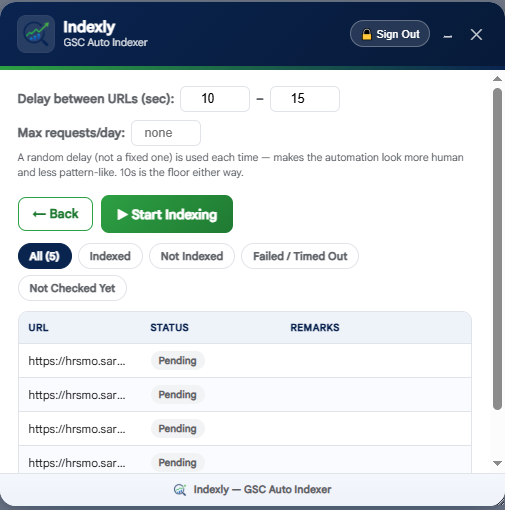
This is what the actual panel looks like — it lives right inside Search Console, not a separate app.